
Automation software
easyLadder
The PLC engine for your Raspberry Pi
Raspberry Pi is a powerful Linux computer widely adopted by technicians and hobbyists, especially for automation projects.
PLCs are extensively used in automation because programs can be implemented quickly and easily. Ladder programming is well suited to automated process control and can be complemented with programming languages for more complex calculations.
easyLadder is a complete PLC engine for Raspberry Pi. It was designed to work with the RasPICER board, although that board is optional. You can use the GPIO port and expand the system with up to 32 Ethernet I/O modules and 32 I2C I/O expanders.

easyLadder features
- Retentive devices.
- Timers and retentive timers at 100 ms and 10 ms.
- Math instructions with floating point support.
- MODBUS TCP/IP server and client functions, since version 1.4.
- I2C I/O expander support, since version 1.5.
- Advanced instructions such as PID control.
- Serial port support.
- Online program editing without stopping control.
- Free easyLadder Studio graphical editor for Windows, with network programming and monitoring.
- Library for interfacing custom C or Python programs with the PLC engine.
- easyLadderHmi library for building HMI applications with Qt.
- TCP/IP security to restrict remote access by IP address and network mask, since version 1.7.
System requirements
easyLadder is compatible with these Raspberry Pi versions:
- Raspberry Pi 1 A+
- Raspberry Pi 1 B+
- Raspberry Pi Zero
- Raspberry Pi 2 B (recommended)
- Raspberry Pi 3 B (recommended)
- Raspberry Pi 4 B (recommended)
- Raspberry Pi 5 (recommended)
A working Ethernet or Wi-Fi connection is required for online programming and monitoring with easyLadder Studio for Windows.
You can also export PLC program files and transfer them manually to the Raspberry Pi file system.
The available software was compiled for Raspbian Jessie. Support for other Linux distributions is available on request.
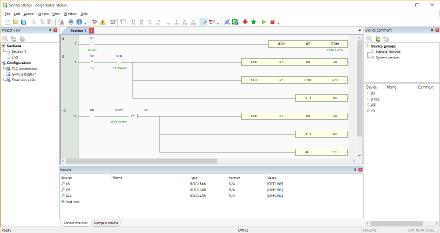
easyLadder Studio: the Ladder editor
easyLadder Studio is a powerful, lightweight Ladder editor that runs remotely on Windows. Its graphical environment makes PLC program management easy.
easyLadder Studio is free and available in the downloads section.
- Write your PLC program.
- Transfer it over the network or export files for manual copying.
- Read the program currently running on the PLC.
- Protect the program with a password.
- Monitor and modify device values in real time.
- Modify and transfer part of the program without stopping control.
- Add comments and descriptions, and divide the program into sections.
- Assign inputs and outputs to external expansion modules.
- Configure PLC runtime parameters.
Extension I/O boards
Alongside Raspberry Pi GPIO and external I2C devices, Ethernet extension modules can expand the system's I/O capabilities.
Up to 32 Ethernet modules can be connected. easyLadder supports SHJ Electronic modules, selected for their quality-to-cost ratio. Other brands may be supported in future.
HMI and easyLadder PLC
A PLC system will often need a human-machine interface to monitor status, execute manual commands, configure parameters or manage process data. Any industrial HMI with a MODBUS TCP driver can be used.
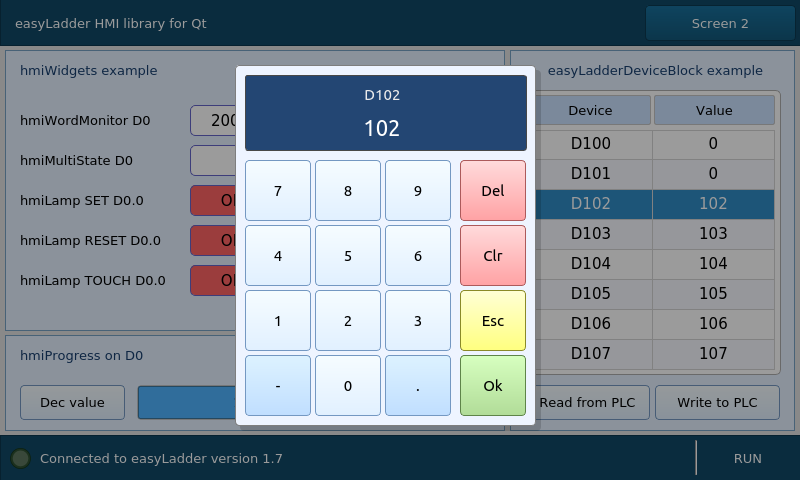
For cost-sensitive applications or special requirements, you can build a custom C++ HMI on the same Raspberry Pi, creating an integrated HMI/PLC system with virtually unlimited possibilities.
easyLadderHmi is a free library for creating Qt and C++ interfaces without learning the PLC communication internals. It includes a full example for the official 7-inch Raspberry Pi touchscreen, adaptable to other displays and local or remote connections.
The library can be compiled on any Linux platform and, with minor changes, on Windows.
Installing on Raspberry Pi
Before installing the engine, Raspberry Pi must run the Raspbian Jessie Linux distribution. If it has Internet access, open a local terminal or SSH session and run:
cd
wget http://www.ferrariehijos.com/easyladdersetup
chmod +x easyladdersetup
sudo ./easyladdersetup
Without Internet access, download the appropriate engine pack and follow the easyLadder user manual.
Ready-to-use SD card image
You can also download an industrial Linux distribution prepared with easyLadder. The image uses Nard GNU/Linux, a toolkit for embedded systems designed to run day and night for years in remote locations.
Nard works like a Live USB: during boot, the system loads into RAM and runs from there. Download and write the image to an SD card, then boot Raspberry Pi to start the PLC.
The default SSH login uses root as the username and pass as the password. Change these credentials before connecting the system to a network.
Downloads
The RasPICER board (coming soon)
In industrial automation, Raspberry Pi GPIO and serial signals use TTL levels and require signal conditioning. The computer also runs on 5 VDC and has no power management.
RasPICER —Raspberry Programmable Industrial Controller with Energy Resources— provides a complete interface to the industrial world. It communicates with Raspberry Pi over SPI. easyLadder was originally designed for this board, although it remains optional.
Its power manager supplies the system from 12–24 VDC or a backup battery. During a power failure, it keeps Raspberry Pi running until the application requests a safe shutdown; it then removes power until supply returns.
An ATX-style push button controls power, while a watchdog power-cycles Raspberry Pi when no activity is detected, helping keep the control application running.
- 8 digital inputs at 12–24 VDC
- 4 relay outputs
- 4 NPN transistor outputs
- 2 analogue inputs at 0–20 mA
- 2 analogue outputs at 0–20 mA
- 1 RS485 port
- 1 RS232 port
- 12–24 VDC power manager
- 3000 mAh rechargeable backup battery
- Real-time clock
- Watchdog functions
Licensing
An easyLadder licence is linked to one Raspberry Pi and cannot be moved to another board for security reasons. Linux can be reinstalled without losing it.
Without a licence, the PLC engine remains fully functional but switches to STOP mode after 15 minutes. It can be returned to RUN mode afterwards.
The System Key is generated when easyLadder starts. Find it in easyLadder.log inside the plcdata directory, normally /opt/effesoftware/plcdata/easyLadder.log.
Volume discounts are available for orders of 10 licences or more. Contact us for details.
€32.80
Taxes included
Enter the System Key and the email address that will receive the licence. Keys are sent within 1–2 working days after payment.
Support
Please read the user manual before sending a question. Email us with comments, feature requests or questions.
info@ferrariehijos.com